Welcome visitors of MIC Computer

Welcome to my blog. With this blog you can post your question about computer and programming for absolutely free (free consultation sponsored by MIC Computer).. Well what are you waiting for just feel free to post your question or share with me about your computer / programming experience

Thursday, September 29, 2011

PHP, Javascript, CSS block scripting

How can server, browser or we can recognise what kind of script at an HTML document? We use some block scripting to open and end it up.
For PHP we use

<?php
php script goes here
?>
we can also use this:
<?
php script goes here
?>
but I always use <?php and ?>

For Javascript we use
<script type="text/javascript">
Javascript script goes here
</script>
we can also use this
<script>
Javascript script goes here
</script>

For CSS we use
<style type="text/css">
CSS style goes here
</style>

Some really basic C# style language (PHP,JavaScript,Java, etc)

Here is some basic rule for some C or C# style language like PHP, Java, Javascript, etc.

  1. always use semicolon ";" at the end of each command line
  2. usually case sensitive
  3. use bracket for block command like this
    if (some condition)
    {
    } else {
    }
  4. can use quote ' or double quote " for string variable like this "my string" or 'my string'

PHP Variable

PHP also have a variable to store temporary data. Just like Javascript variable, PHP variable can store anykind of data in 1 variable. For example, you can store 234 (number) in a variable and then change it to "Hello" (string) later.
PHP have some rule if you want to declare a variable:

  1. a name must start with letter or underscore "_"
  2. a variable name must contain only alpha-numeric characters or underscore (a-z, A-Z, 0-9, _ )
  3. we cannot use space for variable name but we can use _ or with capitalization ($my_var or $myVar) 
  4. php variable is case sensitive

Wednesday, September 14, 2011

Comment

Comment is very important for programmer. Every languages have a comment. This is a comment of some language:

  1. Visual Basic
    • single line '
  2. PHP
    • single line //
    • block /* block comment */
  3. Javascript
    • single line //
    • block /* block comment */
  4. XML
    • single line //
    • block /* block comment */
  5. HTML
    • block <!-- block comment -->

Javascript variable

As any other language, javascript is also has variables. Javascript is case sensitive, so the variable name is case sensitive too. So y variable is different with Y. Javascript variable name must begin with letter or underscore.

This is how you declare javascript variable:
Local Variable:
Has to be declare inside a function. Example:
<script type="text/javascript">
function print_hello()
{
var somewordempty;
document.write("empty " + somewordempty + "<br/>");
somewordempty="assign value to empty";
document.write(somewordempty + "<br/>");
var somewordassign ="assigned variable";
document.write(somewordassign + "<br/>");
}
print_hello();
</script>
Global Variable:
Has to be declare outside functions. I hope this example can make you understand. Example:
<script type="text/javascript">
var globalvar=" <br/>should be global";
document.write(globalvar);
function print_hello()
{
var globalvar="<br/>should be local, because although it have the same name but it declares under a function";
document.write(globalvar);
}
print_hello();
document.write(globalvar + " because it outside the function");
</script>
Let's try to call it again and you will get the same value as above. Because global variable is destroy when we close this page.
<script type="text/javascript">
document.write(globalvar);
</script>

Thursday, September 8, 2011

My First XML

XML stand for eXtention Markup Language. XML has make a big different on the web programming and application. By learning XML we can communicate with a lot of different application language, web or desktop programming language. If you want to learn ajax, XSL, DOM, XHTML, web service, RSS, etc, than you need to learn or know about XML. XML can help us to separate display and data. The different betweenjavascript:void(0) XML and HTML is HTML is for display and XML is for the data. XML store and transfer the data.

Now lets start learning. This is the example of XML document:
<?xml version = "1.0" encoding = "utf-8"?>
<computer>
    <PC>
        <mainboard>
            <processor>
                       <manufacture>Intel</manufacture>
                       <type>Core 2 duo</type>
            </processor>
            <memory type="DDR3">
                    <manufacture>VGEN</manufacture>
                    <capacity>2G</capacity>
            </memory>
        </mainboard>
        <sound_card type="onboard" />
        <vga_card type="onboard" />
    </PC>
    <PC>
        <mainboard>
            <processor>
                       <manufacture>AMD</manufacture>
                       <type>Turion</type>
            </processor>
            <memory type="DDR3">
                    <manufacture>VGEN</manufacture>
                    <capacity>2G</capacity>
            </memory>
        </mainboard>
        <sound_card type="PCI Express" />
        <vga_card type="PCI Express" />
    </PC>
</computer>
Well this data is just an example. But it show us how to make it.
This is the rule to make an XML document:

  1. XML document need this at the first of the document <?xml version = "1.0" encoding = "utf-8"?>
  2. encoding = "utf-8" show us how this XML document should be displayed
  3. XML document need to have a root element. In our example, the root element is <computer>.
  4. XML document should be well formed. It is mean that we should put closed tag on every element. As you can see that if we have open a tag like <mainboard>  than we have to close it </mainboard>. But how about a single element like sound_card and vga_card? The syntax to open and close it is like this <sound_card type="anything" / >
  5. A parameter need to be open and close using " or ' like this <sound_card type="anything" />

Sunday, September 4, 2011

Mainboard

Today I want to share about what is Computer Mainboard. Every computer have a mainboard. What is mainboard? Simple explanation, mainboard is a place where we put/connect every computer other componen. We put memory, VGA Card, Sound Card, we also connect the harddisk, DVD ROM every thing on the mainboard.

This is a picture of a mainboard I take from wikipedia (http://en.wikipedia.org/wiki/Motherboard)
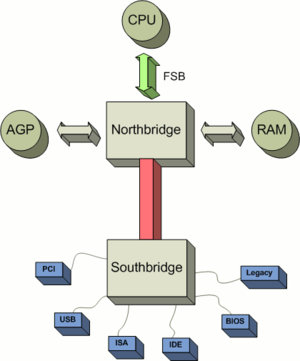
This is the diagram of a mainboard, I take this diagram from wikipedia also (http://en.wikipedia.org/wiki/Chipset):

  1. CPU (Processor)
  2. Memory (RAM)
  3. BUS (FSB etc)
  4. Northbridge Chipset
  5. Southbridge Chipset
  6. VGA
  7. other IO (Input Output)
  8. BIOS
  9. RTC (Real Time Clock)
CPU / Processor
CPU is what we call processor, this is the "brain" of the computer. Its process every thing, that need to be calculating, making decision and everything.

Memory
Memory /RAM is a volatile memory that CPU use to store fast temporary data for the processor. There is a lot of type of it, EDO RAM, SDRAM, DDR 1, DDR 2, DDR 3,etc.

BUS
Bus is the path to link every component of the mainboard. A bus that linked the CPU from the northbridge chipset is very special, and we call it FSB(Front Side Bus). This is a fast BUS because CPU is very fast and it needs a very fast BUS also to avoid bottleneck.

Chipsets
Chipsets if very important for a mainboard/motherboard, because they control everything on the mainboard. Well I want to say that they are the "backbone" of the computer. There is 2 kind of chipsets:
  1. Northbridge 
  2. Southbridge
The Northbridge Chipset control the "fast" components of the mainboard, they are:
  1. CPU
  2. Graphic Card (Onboard or external graphic slots like AGP of PCI Express)
  3. RAM
The  Southbridge Chipset control the "slow" components of the mainboard like:
  1. PCI or ISA slots
  2. PATA or SATA slots (we use it to connect the hard disk to the mainboard)
  3. USB
  4. Sound Card
  5. LAN Card
  6. RTC
  7. BIOS
  8. etc
BIOS
BIOS is the unvolatile memory on the mainboard. It used to tell the CPU what it should do when the computer begin to start. It also store the setting of the computer, like to turn on or off onboard device, setting the boot priority etc.

RTC
RTC is a clock that will always run event when the computer is turned off. That is why your computer clock is always show the correct time, event if you shut it down.

      Friday, September 2, 2011

      Basic HTML elements

      This is some basic HTML elements:
      Heading:
      <h1>This is heading 1</h1>

      This is heading 1

      <h2>This is heading 2</h2>

      This is heading 2

      <h3>This is heading 3</h3>

      This is heading 3


      Paragraph:
      <p>This is paragraph</p>
      This is paragraph

      Link:
      <a href="http://mic-computer.blogspot.com">This is a link</a>
      This is a link, try to click it

      New Line:
      <br> or <br/>
       Horisontal Line:
      <hr> or <hr/>


      List:
      Ordered List:
      <ol>
      <li>Number 1</li>
      <li>Number 2</li>
      <li>Number 3</li>
      </ol>
      1. Number 1
      2. Number 2
      3. Number 3
      UnOrdered List:
      <ul>
      <li>Number 1</li>
      <li>Number 2</li>
      <li>Number 3</li>
      </ul>
      • Number 1
      • Number 2
      • Number 3
      Definition List
      <dl>
      <dt>Title Number 1</dt>
      <dd>Description Number 1</dd>
      <dt>Title Number 2</dt>
      <dd>Description Number 2</dd>
      <dt>Title Number 3</dt>
      <dd>Description Number 3</dd></dl>
      Title Number 1
      Description Number 1
      Title Number 2
      Description Number 2
      Title Number 3
      Description Number 3
      Tips:
      1. Don't forget to use the end tag for some elements that need it like:
      <h1>This is header 1
      2. For a single element like <br>, you should use <br/> for XHTML.

      My First HTML

      Website now is the part of our life. To make a website the first thing we have to know is HTML. HTML is so simple, it can be write and make only using a simple editor like notepad or wordpad. You can also make HTML document using an expert editor like macromedia dreamweaver or microsoft frontpage. HTML document have a file extensions .htm or .html.

      HTML document is also very simple, it contain:

      1. head
      2. body
      this is the example of it:
      <html>
      <head><title>My First HTML</title></head>
      <body>
      Hello World
      </body>
      </html>
      this is a hello world HTML document. Just type it on notepad and save it as first.html or first.htm

      My First Javascript

      Javascript was designed by Brendan Eich at Netscape (with Navigator 2.0) and was used on all browser on 1996. Javascript is an implementation of the ECMAScript language standard and ECMA-262 is the official JavaScript standard. If PHP is a server side programming language, Javascript is a client side programming language. It has the same function like VBscript.

      Javascript is different with java, although they have a lot of same function and syntax. What is the different between javascript, HTML and PHP? You know if you use HTML you cannot make a dynamic page. If you use PHP, you have to refresh the page if you want to update the page. If you use javascript than you can update the page without press the refresh button.

      This is our first javascript program:
      Hello World

      <html>
      <head>
      <title>My First Javascript</title>
      </head>
      <body>
      <script type="text/javascript">
      document.write("Hello World");
      </script>

      </body>
      </html>
       
      Write this code and save it as javascript.html